
macOS Big Surに更新した際に、いくつかプログラミング環境で不具合が出ているみたいですね。私の環境ではVSCodeでPython 3.9を使ってPyTorchが実行できなくなりました。Swift関係では、Apple純正のものは大丈夫なのでしょうが外部ライブラリー関係がダメなようですね。私の環境ではCocoapodsを更新しようとすると動かなくなりました。
これが正しい対処法というわけではないですが、私の環境でバグがとれたエラー対処方法を記載すると他のユーザーの参考になるかもしれないと思い記載しておきます。
「sudo gem update cocoapods」を実行した際のエラーログは以下のものでした。
tomoimacpro@shishidotomoyukinoiMac-puro HelloOSC % sudo gem update cocoapods
Password:
Updating installed gems
Updating cocoapods
Building native extensions. This could take a while...
ERROR:  Error installing cocoapods:
	ERROR: Failed to build gem native extension.
    current directory: /Library/Ruby/Gems/2.6.0/gems/ffi-1.13.1/ext/ffi_c
/System/Library/Frameworks/Ruby.framework/Versions/2.6/usr/bin/ruby -I /Library/Ruby/Site/2.6.0 -r ./siteconf20201126-14271-1todsa2.rb extconf.rb
*** extconf.rb failed ***
Could not create Makefile due to some reason, probably lack of necessary
libraries and/or headers.  Check the mkmf.log file for more details.  You may
need configuration options.
Provided configuration options:
	--with-opt-dir
	--without-opt-dir
	--with-opt-include
	--without-opt-include=${opt-dir}/include
	--with-opt-lib
	--without-opt-lib=${opt-dir}/lib
	--with-make-prog
	--without-make-prog
	--srcdir=.
	--curdir
	--ruby=/System/Library/Frameworks/Ruby.framework/Versions/2.6/usr/bin/$(RUBY_BASE_NAME)
	--with-ffi_c-dir
	--without-ffi_c-dir
	--with-ffi_c-include
	--without-ffi_c-include=${ffi_c-dir}/include
	--with-ffi_c-lib
	--without-ffi_c-lib=${ffi_c-dir}/lib
	--enable-system-libffi
	--disable-system-libffi
	--with-libffi-config
	--without-libffi-config
	--with-pkg-config
	--without-pkg-config
/System/Library/Frameworks/Ruby.framework/Versions/2.6/usr/lib/ruby/2.6.0/mkmf.rb:467:in `try_do': The compiler failed to generate an executable file. (RuntimeError)
You have to install development tools first.
	from /System/Library/Frameworks/Ruby.framework/Versions/2.6/usr/lib/ruby/2.6.0/mkmf.rb:546:in `block in try_link0'
	from /System/Library/Frameworks/Ruby.framework/Versions/2.6/usr/lib/ruby/2.6.0/tmpdir.rb:93:in `mktmpdir'
	from /System/Library/Frameworks/Ruby.framework/Versions/2.6/usr/lib/ruby/2.6.0/mkmf.rb:543:in `try_link0'
	from /System/Library/Frameworks/Ruby.framework/Versions/2.6/usr/lib/ruby/2.6.0/mkmf.rb:570:in `try_link'
	from /System/Library/Frameworks/Ruby.framework/Versions/2.6/usr/lib/ruby/2.6.0/mkmf.rb:672:in `try_ldflags'
	from /System/Library/Frameworks/Ruby.framework/Versions/2.6/usr/lib/ruby/2.6.0/mkmf.rb:1832:in `pkg_config'
	from extconf.rb:9:in `system_libffi_usable?'
	from extconf.rb:42:in `<main>'
To see why this extension failed to compile, please check the mkmf.log which can be found here:
  /Library/Ruby/Gems/2.6.0/extensions/universal-darwin-20/2.6.0/ffi-1.13.1/mkmf.log
extconf failed, exit code 1
Gem files will remain installed in /Library/Ruby/Gems/2.6.0/gems/ffi-1.13.1 for inspection.
Results logged to /Library/Ruby/Gems/2.6.0/extensions/universal-darwin-20/2.6.0/ffi-1.13.1/gem_make.out
Gems updated: ffi
Gems already up-to-date: cocoapods
ネットでググると過去のOS更新の際には「xcode-select –install」で直ったとのことで試しましたがダメでした。
以下に今回のBig Surの更新で私の場合に有効だったやり方を記載しておきます。
- 「sudo gem uninstall -n /usr/local/bin cocoapods」:まず、cocoapodsをアンインストールしました。
- Xcodeを除去して新たに「Xcode12.2(最新版)」を再インストールしました。
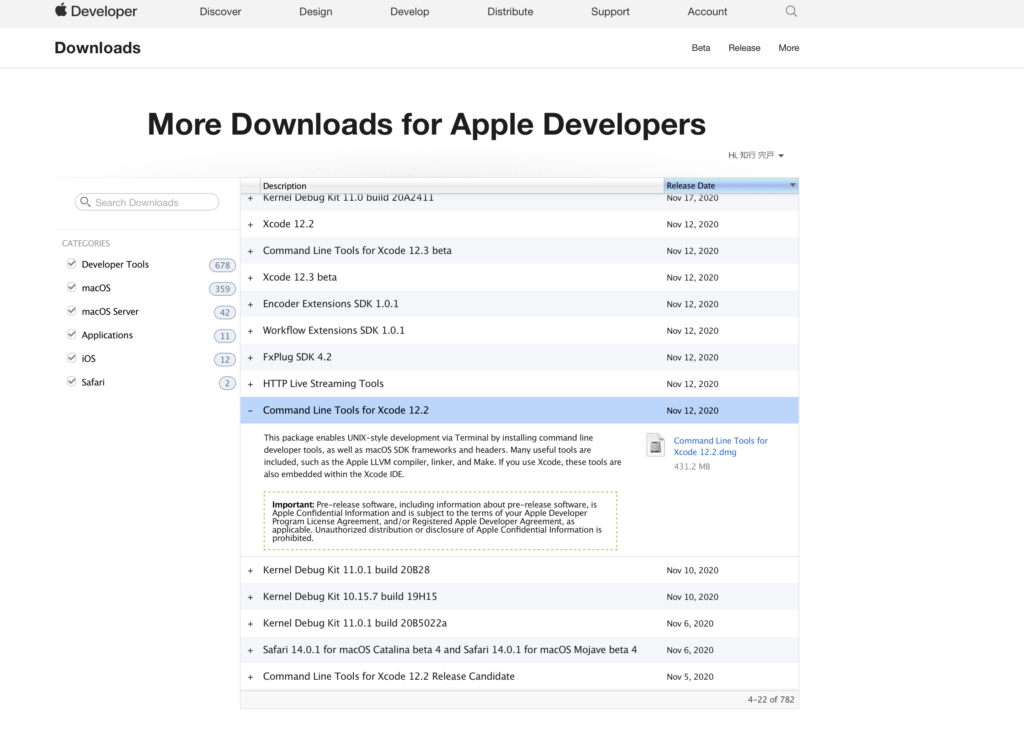
- Apple DeveloperのDownloadsから「Command Line tools for Xcode 12.2」をdownloadしてインストールしました。
- 「sudo gem install -n /usr/local/bin cocoapods」:cocoapodsを再インストールしました。
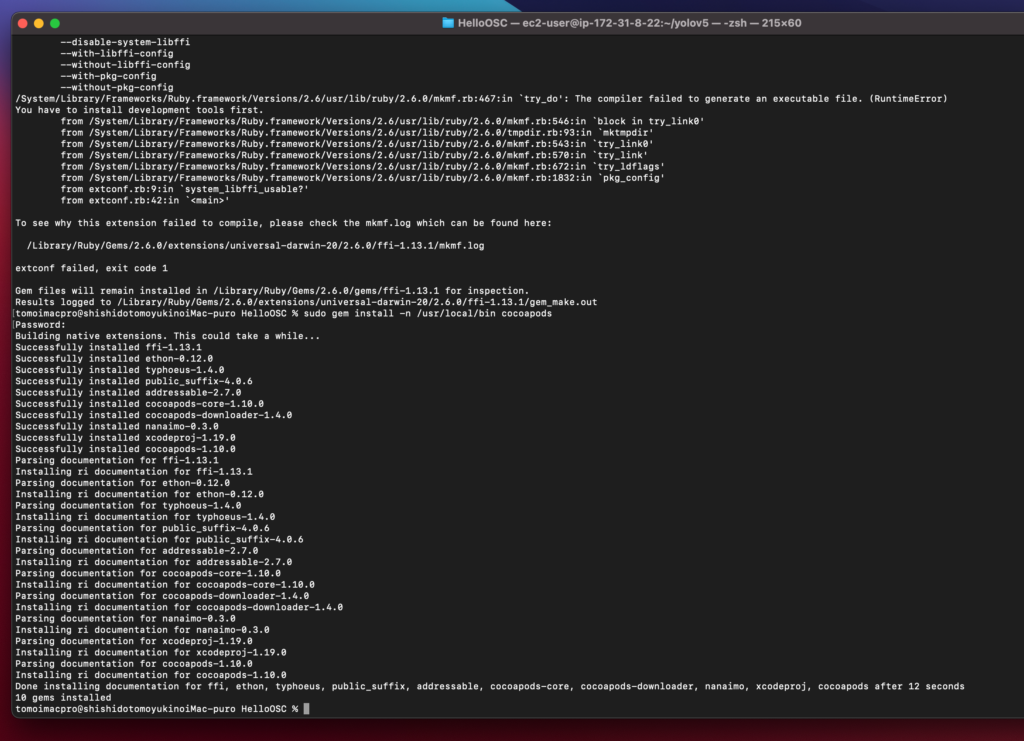
これでCocoapodsの最新版がインストールできました。
「Command Line tools for Xcode 12.2」はこんな感じでした。
これが誰かの参考になるとよいですが、、、、
コメント